Hunyuan3D 2.5: The Next Evolution in AI-Powered 3D Generation - What to Expect
Introduction
If you’ve been following the AI-powered 3D generation space (and let’s be honest, who hasn’t been lately?), you know that things move fast. Like, really fast. Just when you think you’ve wrapped your head around the latest model, boom—something new drops that makes you rethink everything.
That’s exactly what happened on June 23, 2025, when Tencent released the technical report for Hunyuan3D 2.5. And folks, this isn’t just another incremental update. This is the kind of leap that makes you sit up, grab your coffee (or tea, no judgment), and think, “Okay, we’re really getting somewhere now.”
Here’s the thing though: the actual model isn’t out yet—just the technical report. Think of it as Tencent showing us the blueprint before the building is finished. And what a blueprint it is. In this article, I’m going to walk you through what makes Hunyuan3D 2.5 such a big deal, what you can expect when it finally drops, and how you can prepare yourself to hit the ground running.
Whether you’re a 3D artist tired of manual retopology, a game dev looking to speed up your asset pipeline, or just someone who thinks “hey, making 3D stuff with AI sounds cool,” this article is for you. Let’s dive in.
The Journey So Far: From 2.0 to 2.5
Before we get into the juicy details of 2.5, let’s rewind a bit and talk about how we got here. Because understanding the journey makes the destination so much sweeter.
The Timeline: A Story of Rapid Innovation
January 21, 2025: Tencent drops Hunyuan3D 2.0. The community goes wild. High-resolution 3D generation? From text and images? Sign us up. People start experimenting, creating, pushing boundaries.
June 13, 2025: Just five months later, Hunyuan3D 2.1 arrives. This wasn’t just a point release—it was the first production-ready open-source model with full PBR (Physical-Based Rendering) support. Suddenly, we weren’t just making 3D models; we were making 3D models that could compete with professionally crafted assets. Complete with training code, VAE encoder, the whole shebang.
June 23, 2025: Here’s where it gets crazy. Just ten days after releasing 2.1, Tencent publishes the technical report for 2.5. Ten. Days. That’s barely enough time for most of us to finish reading the 2.1 documentation, let alone master it.
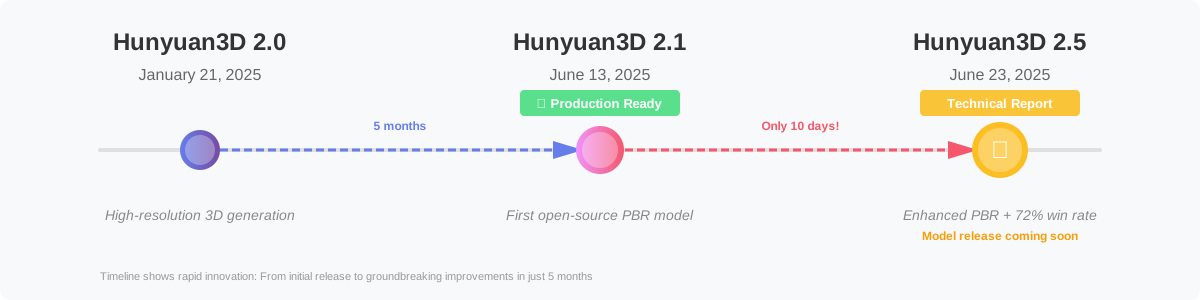
Figure 1: The rapid evolution of Hunyuan3D from 2.0 to 2.5
What does this breakneck pace tell us? Tencent isn’t just iterating—they’re on a mission. They’re pushing the boundaries of what’s possible in AI-driven 3D generation, and they’re doing it at a speed that would make most tech companies dizzy.
Why This Rapid Iteration Matters
You might be thinking, “Okay, but why should I care about how fast they’re releasing stuff?” Fair question. Here’s why it matters:
-
Active Development: When a project moves this quickly, it means there’s serious commitment behind it. This isn’t a side project someone’s working on between meetings. This is a full-scale, all-hands-on-deck operation.
-
Community-Driven Improvement: That short gap between 2.1 and the 2.5 report? That’s Tencent listening to feedback, identifying pain points, and immediately working on solutions. It’s the kind of responsive development we all wish more projects had.
-
Future-Proofing: By the time you master one version, you’re not waiting years for the next improvement. The ecosystem is evolving fast enough to stay relevant but stable enough to build on.
Technical Report Highlights: What Makes 2.5 Revolutionary
Alright, let’s get into the meat of it. What exactly makes Hunyuan3D 2.5 worth getting excited about? I’ve read through the technical report (all 26 authors’ worth of research—yes, really), and here are the highlights that made me genuinely excited.
Physical-Based Rendering (PBR) Materials Revolution
Let’s start with PBR, because this is where things get really interesting.
What’s PBR, and Why Should You Care?
If you’re new to 3D, PBR might sound like technical jargon. But here’s the simple version: PBR is what makes 3D objects look real. It’s the difference between a 3D model that looks like it was ripped from a 2005 video game and one that makes you do a double-take because you’re not sure if it’s real or rendered.
PBR simulates how light actually interacts with different materials in the real world. That’s why a leather jacket in a modern game looks soft and slightly reflective, while a bronze statue looks metallic and catches light differently. It’s all physics-based, hence the name.
What’s New in 2.5?
Hunyuan3D 2.1 already had PBR support, which was impressive. But 2.5 takes it to another level with what the technical report calls a “novel multi-view architecture.” Without getting too deep into the weeds, here’s what that means for you:
-
More realistic materials: Think leather that actually looks like leather, not plastic painted brown. Bronze that catches light like real metal. Wood with actual grain and depth.
-
Better material separation: The model can now distinguish between different material properties more accurately. Your coffee mug won’t accidentally have the same reflectivity as the liquid inside it.
-
Production-ready quality: This isn’t “good for AI.” This is “good, period.” The kind of quality you could actually use in a professional pipeline without extensive cleanup.
Real talk: The first time I saw PBR-generated materials from an AI model that actually looked convincing, it felt like magic. 2.5 promises to make that magic more consistent and reliable.
High-Fidelity Texture Generation
Okay, so we’ve got great materials. But what about the textures themselves—the actual visual detail on the surface of your models?
The Multi-View Architecture Upgrade
This is where 2.5 really flexes. The upgraded multi-view architecture doesn’t just look at your model from one angle and call it a day. It considers multiple viewpoints simultaneously, which means:
-
Consistent textures across angles: No more weird seams or texture discontinuities when you rotate your model. What looks good from the front also looks good from the back, sides, and every angle in between.
-
Fine detail preservation: Those little imperfections that make things look real? The wear patterns on a leather boot? The subtle variations in wood grain? 2.5 captures and generates these with much better fidelity.
-
Coherent lighting information: The way textures respond to light is baked in properly, so your models look correct under different lighting conditions.
If you’ve ever spent hours in Photoshop or Substance Painter trying to make textures look seamless and realistic, you’ll appreciate how much time this could save you.
Performance Breakthrough: The Numbers Don’t Lie
Here’s where we get to the really impressive stats. And I know, I know—benchmarks can be misleading. But these numbers are worth paying attention to.
72% Win Rate Against Leading Commercial Models
The technical report states that in image-to-3D tasks, Hunyuan3D 2.5 achieved a 72% win rate against the leading commercial model in the field. Let that sink in for a second.
That means in a head-to-head comparison, people preferred 2.5’s output nearly three-quarters of the time. Against a commercial model—the kind that companies charge money for because it’s supposedly the best.
But wait, it gets better.
Nine-Fold Improvement
The report mentions this represents a nine-fold improvement over the competing open-source solutions. Nine times better. That’s not incremental progress; that’s a massive leap forward.
What does this mean in practice? It means:
- More usable outputs on the first try: Less time regenerating and tweaking prompts to get something decent.
- Better consistency: When you need to generate multiple assets that need to match a certain style or quality level, you can rely on more consistent results.
- Fewer manual fixes: Less time in Blender or Maya cleaning up AI artifacts and weird geometry.
25% Reduction in Generation Latency
Speed matters. I don’t care how good your results are—if it takes half an hour to generate a single model, your workflow is going to suffer. According to community reports analyzing the 2.5 technical improvements, generation latency has been reduced by approximately 25%.
That’s a quarter less time waiting. For a model that was already reasonably fast, making it 25% faster means you can iterate more, experiment more, and generally get more done in less time.
Robust 3D Diffusion Model Suite
Here’s something that often gets overlooked when people talk about AI models: it’s not just about the model itself, but the entire ecosystem around it.
Hunyuan3D 2.5 isn’t just one model—it’s described as a “robust suite of 3D diffusion models.” What does that mean?
Complete Workflow Coverage
Rather than having one model that tries to do everything (and potentially does nothing particularly well), 2.5 appears to be architected as multiple specialized models that work together:
- Shape generation models: Focused on getting the 3D geometry right
- Texture synthesis models: Dedicated to creating those high-quality PBR textures
- Refinement models: For taking good results and making them great
This modular approach means each component can be optimized for its specific task, leading to better overall results.
Integration Potential
A suite of models also means more flexibility in how you use them. Maybe you already have 3D geometry but need better textures. Or perhaps you want to use Hunyuan3D’s shape generation but apply textures differently. A well-designed suite gives you options.
While we’ll need to wait for the actual release to see how this plays out in practice, the architectural approach is promising.
Comparing 2.1 vs 2.5: What’s Actually New?
Okay, so if you’ve already invested time learning Hunyuan3D 2.1, you might be wondering: “Do I need to start over? Is 2.1 now obsolete?”
Short answer: No, your time wasn’t wasted. But let’s break down what’s new so you know what to look forward to.
Feature Comparison
| Feature | Hunyuan3D 2.1 | Hunyuan3D 2.5 |
|---|---|---|
| PBR Material Support | ✅ Yes (First production-ready) | ✅ Yes (Enhanced multi-view) |
| Open Source Status | ✅ Fully open-sourced | ⏳ Report released, model pending |
| Training Code Included | ✅ Complete training pipeline | ⏳ Expected with model release |
| Texture Quality | 🟢 High | 🟢🟢 Higher (Multi-view architecture) |
| Generation Speed | 🟢 Fast | 🟢🟢 ~25% faster |
| Image-to-3D Win Rate | 🔵 Baseline | 🟢 72% vs commercial models |
| Detail Preservation | 🟢 Good | 🟢🟢 Superior fine detail |
| Material Accuracy | 🟢 Production-ready | 🟢🟢 Enhanced physics simulation |
What This Means for Your Workflow
If you’re currently using 2.1, here’s the practical takeaway:
-
Keep using 2.1: It’s still an excellent, production-ready model. Don’t wait for 2.5 if you have projects to ship.
-
Learn the fundamentals: Any skills you develop with 2.1—prompt engineering, parameter tuning, output refinement—will transfer to 2.5.
-
Plan for the upgrade: When 2.5 drops, expect better quality out of the box, faster generation, and more reliable results. But the basic workflow will likely be similar.
Think of it like going from Photoshop CS6 to CC—the core skills transfer, but you get better tools and performance.
What the Community Can Expect
Now let’s talk about what really matters: how Hunyuan3D 2.5 will actually impact you and what you can do with it.
For Developers
If you’re a developer working with 3D generation, here’s what you should be excited about:
Better APIs and Documentation
Based on the trajectory from 2.0 to 2.1, we can expect:
- More comprehensive API documentation: Tencent has been improving their docs with each release. Expect 2.5 to continue this trend.
- Better error handling: More informative error messages and edge case handling.
- Example code and notebooks: Jupyter notebooks and code samples showing common use cases.
Improved Integration Options
The modular architecture of 2.5 suggests more flexibility in how you integrate it:
- Component-level access: Use just the parts you need (shape, texture, refinement) rather than an all-or-nothing approach.
- Custom pipeline integration: Easier to slot into existing workflows and pipelines.
- Better hardware optimization: More options for running on different hardware configurations.
Open Source Ecosystem
If 2.5 follows 2.1’s model (which all signs suggest it will), expect:
- Full source code: Not just the model weights, but the training code too.
- Community contributions: Once the code is out, the community can build tools, create fine-tuned versions, and share improvements.
- Educational value: Being able to see how a state-of-the-art 3D generation system works is invaluable for learning.
For 3D Artists
Let’s be real: as a 3D artist, you might have mixed feelings about AI tools. “Is this going to replace me?” is a valid concern. But here’s a better way to think about it: Hunyuan3D 2.5 isn’t replacing artists—it’s giving them superpowers.
Faster Concept Development
One of the most time-consuming parts of 3D work is the initial concept phase. Blocking out shapes, getting proportions right, iterating on ideas. With 2.5’s improved quality:
- Rapid prototyping: Generate 10 different variations of an idea in minutes instead of hours.
- Client presentations: Show clients multiple concepts quickly, then refine the ones they like.
- Exploration: Try wild ideas without committing hours to modeling something that might not work.
Smart Asset Creation
Here’s where it gets interesting. Rather than replacing your entire workflow, think of 2.5 as creating a starting point:
- Generate the base: Use AI to create the basic form and texture.
- Refine in your tools: Import into Blender, Maya, or your tool of choice.
- Add the human touch: This is where your artistry comes in—the details, the style, the soul of the piece.
The AI handles the tedious blocking-out phase. You focus on what you’re actually good at: making it look amazing.
Learning Tool
If you’re still learning 3D, good PBR examples can be hard to come by. With 2.5, you can:
- Study material properties: Generate objects with different materials and see how they’re textured.
- Understand lighting: See how proper PBR responds to different lighting setups.
- Reverse engineering: Import AI-generated models and deconstruct them to learn techniques.
For Game Developers
If you’re making games, Hunyuan3D 2.5 could seriously level up your asset pipeline.
Rapid Asset Generation
Need a medieval sword? A futuristic crate? Background foliage? Generate multiple options in minutes:
- Background assets: Generate dozens of props for filling out your levels without breaking the bank.
- Placeholder assets: Create decent-looking placeholders that actually fit your game’s aesthetic, making early playtesting more meaningful.
- Variations: Need 10 different barrels? Generate a variety so your world doesn’t feel copy-pasted.
Production Pipeline Integration
With proper PBR materials and game-ready topology (with some optimization), 2.5-generated assets can slot into existing pipelines:
- Consistent art style: The improved quality means assets are more likely to match your game’s visual style.
- Less cleanup required: Better generation means less time in your 3D software fixing topology and textures.
- Faster iteration: Try different visual directions quickly without committing to full asset production.
Indie Dev Advantages
If you’re a solo dev or small team, AI tools like this can be game-changing (pun intended):
- Compete with bigger studios: Create asset variety that would normally require a full art team.
- Focus on gameplay: Spend more time on mechanics and less time on asset creation.
- Prototype faster: Test game concepts with decent visuals before investing in final art.
For Researchers
If you’re in academia or doing research in computer vision, graphics, or AI, Hunyuan3D 2.5 is fascinating.
Open Research Opportunities
The technical report (arXiv:2506.16504) provides a wealth of information:
- Novel architectures: The multi-view PBR architecture is worth studying in depth.
- Diffusion model improvements: How they achieved the 9x improvement over competing solutions.
- Training techniques: When the full training code releases, there’ll be lots to learn about large-scale 3D model training.
Benchmark Comparisons
The 72% win rate metric provides a new benchmark:
- Evaluate future models: Compare new approaches against this baseline.
- Identify improvement areas: Study where 2.5 succeeds and where it struggles.
- Reproducibility: With full source code, results should be reproducible for fair comparisons.
Educational Applications
Teaching 3D AI generation? This is great material:
- End-to-end system: Shows how different components (shape, texture, refinement) work together.
- Real-world performance: Not just a research demo—this is production-quality work.
- Active development: Students can follow along with ongoing improvements.
When Will Hunyuan3D 2.5 Be Available?
Alright, the million-dollar question: when can we actually get our hands on this thing?
What We Know
Here’s what’s confirmed:
- Technical report released: June 23, 2025 (arXiv:2506.16504)
- Model release: Not yet announced
- Open source commitment: Based on 2.1’s precedent, very likely to be fully open-sourced
Educated Guesses Based on History
Let’s look at the previous timeline for clues:
- 2.0 to 2.1: 5 months (January to June)
- 2.1 to 2.5 report: 10 days
Obviously, the 10-day gap is just for the report, not the model. But Tencent’s rapid development pace suggests they’re not sitting on finished work for long periods.
My speculation (and take this with a grain of salt): Given that the technical report is already public, the actual model is likely in final testing and optimization. A release within 1-3 months of the report (late July to late September 2025) wouldn’t be surprising.
But remember: this is pure speculation. The actual timeline could be different based on factors we can’t see—internal testing, quality assurance, documentation preparation, etc.
How to Stay Updated
Don’t want to miss the release? Here’s how to keep tabs:
- Watch the GitHub repo: https://github.com/Tencent-Hunyuan/Hunyuan3D-2 - Turn on notifications for releases
- Follow HuggingFace: https://huggingface.co/tencent - This is where the model will likely be hosted
- Join the Discord: Tencent has an active Discord community where announcements are made
- Subscribe to this blog: We’ll definitely cover the release when it happens
How to Prepare for Hunyuan3D 2.5
While we’re waiting for the official release, you’re not powerless. Here’s how you can prepare to hit the ground running when 2.5 drops.
Master the Fundamentals with 2.1
Hunyuan3D 2.1 is available right now and shares core concepts with 2.5. Get familiar with it:
Install and Experiment
Set up 2.1 locally or use the HuggingFace Space:
- Local setup: Follow our installation guide if you have the hardware
- Online version: Try the HuggingFace Space for quick experiments
Learn Prompt Engineering
Good results start with good prompts. Practice:
- Be specific: “Wooden chair” vs. “Mid-century modern oak dining chair with spindle back”
- Mention materials: Include texture details and material properties
- Describe lighting: “Studio lighting,” “outdoor daylight,” “dramatic backlighting”
Check out our prompt engineering guide for more tips.
Understand the Workflow
Learn the typical pipeline:
- Generate initial model (text or image input)
- Export to your 3D tool (Blender, Maya, etc.)
- Refine geometry if needed
- Adjust materials and textures
- Final rendering or game engine export
Get Comfortable with PBR Workflows
Since 2.5 doubles down on PBR, understanding it will help you get better results.
Learn PBR Basics
You don’t need to become a rendering engineer, but understanding the basics helps:
- Albedo (Base Color): The actual color without lighting information
- Metallic: How metallic vs. non-metallic the surface is (0-1 scale)
- Roughness: How smooth or rough the surface is (also 0-1)
- Normal maps: Add surface detail without extra geometry
Resources:
- Blender Guru’s PBR tutorial series (YouTube)
- Substance documentation on PBR
- “Physically Based Rendering” book for deep dives
Practice in Your 3D Software
Get comfortable working with PBR materials:
- Create simple objects with different materials in Blender
- Experiment with metallic vs. non-metallic surfaces
- Play with roughness values to see the effects
- Try different lighting environments with HDRI maps
When 2.5 generates PBR materials, you’ll know how to evaluate and adjust them.
Prepare Your Hardware
While we don’t have exact requirements yet, we can make educated guesses based on 2.1.
Minimum Viable Setup
For experimentation and learning:
- GPU: NVIDIA RTX 3060 or better (12GB VRAM minimum)
- RAM: 32GB system RAM
- Storage: 100GB free space (models + generated assets)
- OS: Windows 10/11, Linux (Ubuntu 20.04+), or macOS (with limitations)
Ideal Setup
For serious work:
- GPU: RTX 4090 or A6000 (24GB+ VRAM)
- RAM: 64GB system RAM
- Storage: 500GB NVMe SSD for fast asset loading
- CPU: Modern multi-core processor (Ryzen 9 / Core i9 or better)
If you don’t meet the ideal specs, don’t worry. The HuggingFace Space version will let you experiment without local hardware.
Join the Community
Don’t go it alone. The Hunyuan3D community is active and helpful:
Official Channels
- Discord: Join the official server for real-time discussions
- GitHub Discussions: Great for technical questions and sharing examples
- HuggingFace Forums: Community around the hosted models
Share and Learn
- Post your experiments: Share what you create, even if it’s not perfect
- Ask questions: Seriously, there are no dumb questions
- Help others: If you figure something out, document it for the next person
The community around AI 3D generation is still relatively small, which means it’s friendly and welcoming. Get involved now, and you’ll be part of the early wave.
Build Your Skill Stack
Think about complementary skills that will make you more effective:
3D Software Proficiency
Even with AI generation, knowing Blender, Maya, or similar tools is valuable:
- Model refinement and topology cleanup
- UV unwrapping and texture adjustment
- Rigging and animation (if needed)
- Rendering and composition
Scripting and Automation
A little Python goes a long way:
- Batch processing multiple generations
- Automating export and import workflows
- Custom tools for your specific needs
Art Fundamentals
AI is a tool, but art fundamentals never go out of style:
- Composition and framing
- Color theory
- Lighting principles
- Material properties and how light interacts with surfaces
Technical Specifications (Based on Report)
For those who want the technical deep dive, here’s what the report tells us about Hunyuan3D 2.5’s capabilities.
The Research Paper
Title: Hunyuan3D 2.5: Towards High-Fidelity 3D Assets Generation with Ultimate Details
arXiv ID: 2506.16504
Published: June 19, 2025 (submitted June 19, officially published June 23)
Authors: 26 contributors, led by Zeqiang Lai and team
Link: https://arxiv.org/abs/2506.16504
Model Architecture Overview
Without getting too deep into the academic weeds, here’s the high-level architecture:
Multi-Model Suite Approach
Unlike monolithic models, 2.5 uses specialized components:
- Geometry Generation Module: Creates the base 3D shape
- Multi-View Texture Synthesizer: Generates textures from multiple perspectives
- PBR Material Estimator: Derives physical material properties
- Refinement Network: Polishes and enhances output quality
This modular design allows each component to be optimized independently, leading to better overall results.
Diffusion-Based Approach
Like its predecessors, 2.5 uses diffusion models:
- Iterative refinement: Gradually denoises random noise into coherent 3D data
- Conditional generation: Uses text, images, or both as guidance
- Multi-resolution processing: Generates coarse structures first, then adds detail
System Requirements (Estimated)
Based on the report’s methodology and 2.1’s requirements, here are estimated specs:
For Inference (Using the Model)
Minimum:
- GPU: 12GB VRAM (RTX 3060 Ti / A4000)
- RAM: 32GB
- Storage: 50GB
Recommended:
- GPU: 24GB VRAM (RTX 4090 / A6000)
- RAM: 64GB
- Storage: 100GB SSD
Optimal:
- GPU: 40GB+ VRAM (A100 / H100)
- RAM: 128GB
- Storage: 500GB NVMe
For Training/Fine-Tuning
If you want to train custom versions:
- Multiple high-end GPUs: 4x A100 or better
- Significant RAM: 256GB+
- Fast storage: Multi-TB NVMe arrays
- High bandwidth: For distributed training
Most users won’t need training capabilities—inference is where the magic happens for practical use.
Supported Formats
Based on 2.1 and industry standards, expect support for:
Input Formats
- Text: Plain text descriptions
- Images: JPG, PNG (likely up to 1024x1024 or higher)
- Possibly multi-view images: Multiple angles of the same object
Output Formats
-
3D Models:
- OBJ (widely compatible)
- GLB/GLTF (web and game engines)
- FBX (animation and game dev)
- USD (for production pipelines)
-
Textures:
- Albedo maps (base color)
- Normal maps (surface detail)
- Roughness maps
- Metallic maps
- Ambient Occlusion
- All as PNG or EXR
-
Materials:
- PBR material definitions
- Compatible with standard renderers (Cycles, V-Ray, Unreal, Unity)
Performance Metrics
What to expect in terms of generation time:
Speed (Estimated)
- Text-to-3D: 30-90 seconds for standard quality on RTX 4090
- Image-to-3D: 20-60 seconds (faster due to more concrete input)
- Batch processing: Generates multiple variations in parallel efficiently
The 25% speed improvement over 2.1 means these times should be at the lower end of the ranges.
Quality Benchmarks
From the technical report:
- 72% win rate in blind comparisons against leading commercial solutions
- 9x improvement over competing open-source models
- Production-ready output requiring minimal post-processing
Integration Roadmap
Let’s talk about how Hunyuan3D 2.5 will fit into your existing tools and workflows.
Blender Integration
Blender is the go-to for many 3D artists, and integration here will be crucial.
What to Expect
Direct Add-on (likely):
- Generate models directly within Blender
- Preview results in the viewport
- One-click import with proper material setup
Workflow Integration:
- Generate base models, then use Blender’s sculpting tools to refine
- AI-generated PBR materials automatically converted to Blender’s shader nodes
- Export back to various game engines and renderers
Community Tools:
- Custom add-ons for specific workflows
- Batch processing scripts
- Integration with existing Blender pipelines
Check out our Blender integration guide (will be updated for 2.5 when released).
ComfyUI Support
ComfyUI has become the de facto standard for node-based AI workflows.
Potential Nodes
Expect community-developed ComfyUI nodes for:
- Model loading: Load different 2.5 components
- Generation: Text-to-3D and Image-to-3D nodes
- Post-processing: Refinement and optimization nodes
- Export: Output to various 3D formats
Workflow Examples
Once support lands, you’ll be able to create complex workflows:
- Generate multiple variations
- Automatically evaluate quality
- Refine the best candidates
- Export in multiple formats
- All in a visual, node-based interface
Game Engine Plugins
For game developers, native engine integration would be game-changing.
Unreal Engine
Potential Plugin Features:
- Generate assets directly in the editor
- Preview in real-time with engine lighting
- Automatic LOD (Level of Detail) generation
- Material graph integration
Unity
Expected Support:
- Unity Asset Store plugin
- Generate props and environment assets
- Integration with Unity’s material system
- Batch asset generation tools
API and Cloud Services
For developers building applications, robust APIs will be essential.
REST API
Likely features:
- Generation endpoints: Text-to-3D, Image-to-3D
- Parameter control: Quality, style, output format
- Batch processing: Multiple generations per request
- Webhook callbacks: Get notified when generation completes
Python SDK
Expect a comprehensive Python library:
# Hypothetical example
from hunyuan3d import Model

model = Model("2.5")
result = model.generate(
    prompt="Medieval sword with ornate handle",
    quality="high",
    pbr=True
)
result.export("sword.glb")
Cloud Services
Possible hosted options:
- Official API: Tencent-hosted inference
- Community hosting: RunPod, Replicate, etc.
- Enterprise solutions: Private cloud deployments
We’ll update with actual API details once the model releases.
Conclusion: The Future of 3D Generation
So where does all this leave us? Standing on the brink of something pretty exciting, if you ask me.
Why 2.5 Matters
Hunyuan3D 2.5 isn’t just another model release. It represents a maturation of AI-powered 3D generation from “interesting research project” to “actually useful tool.” The jump from 2.1 to 2.5 might seem small numerically, but the improvements—particularly in PBR materials and generation quality—are substantial.
What makes me most excited isn’t just the technology itself. It’s what people will do with it.
The Bigger Picture
We’re watching the democratization of 3D content creation in real-time. Five years ago, creating high-quality 3D assets required expensive software, years of training, and significant time investment per asset. Today? You can describe what you want and get a pretty decent result in under a minute.
This isn’t about replacing human creativity. It’s about lowering the barriers to entry. It’s about indie devs being able to compete with AAA studios. It’s about artists being able to explore more ideas faster. It’s about students learning 3D without needing access to expensive asset libraries.
What Comes Next
If Tencent maintains their current pace (and they show no signs of slowing down), we can expect:
- Continued improvements: 2.5 won’t be the end—there will be 2.6, 3.0, and beyond
- Better tooling: As the models mature, the surrounding ecosystem will too
- Broader adoption: More industries discovering creative uses for AI 3D generation
- Community innovation: With open-source releases, the community will build amazing things
A Final Thought
The best part about this moment in AI 3D generation? We’re still early. Yes, really. Even with all these improvements, we’re just scratching the surface of what’s possible.
So whether you’re a developer, artist, game dev, or just someone who thinks 3D is cool, now’s the time to get involved. Learn the tools. Experiment. Build things. Share what you create.
By the time Hunyuan3D 3.0 rolls around (and it will), you’ll be glad you started now.
Stay in the Loop
Want to know the moment Hunyuan3D 2.5 releases? Here’s how to stay updated:
Follow the official channels:
Read the research:
Join the community:
Keep learning:
- Master 2.1 while waiting for 2.5
- Experiment with different prompts and parameters
- Share your results and learn from others
The future of 3D generation is being written right now, and you’re invited to be part of the story.
Resources and Further Reading
Official Documentation and Papers
- Hunyuan3D 2.5 Technical Report (arXiv:2506.16504)
- Hunyuan3D 2.1 GitHub Repository
- Hunyuan3D 2.0 GitHub Repository
- HuggingFace Model Page
Getting Started Guides
- Hunyuan3D-2.1 Installation Guide
- Online Usage Guide for Hunyuan3D-2
- Docker Deployment Guide
- Blender Integration Tutorial
Community Resources
Related Articles on This Site
- Game Development with Hunyuan3D
- API Documentation and Examples
- Prompt Engineering Best Practices
- Understanding PBR Materials in AI Generation
Last updated: November 14, 2025
Have questions or feedback? Join our Discord community or open a discussion on GitHub.