AI VTuber 3D Model Maker
Create your custom VTuber 3D model from a single 2D sketch or text prompt. Our free AI VTuber generator creates fully rigged, ready-to-stream VRM avatars in minutes.
Are you an aspiring VTuber struggling to turn your 2D concept art into a fully rigged 3D streaming avatar?
Commissioning a custom VRM model from a 3D modeler can cost thousands of dollars and take months of back-and-forth iteration. For independent creators, this financial barrier is often the hardest part of starting a VTuber career.
The Hunyuan3D AI VTuber Generator removes this barrier entirely. You can upload your existing 2D character sheet, or simply type out a prompt describing your ideal avatar, and instantly generate a production-ready 3D mesh.
Here is how our free AI tool accelerates your VTuber debut.
Build a VTuber 3D Model in Minutes, Not Months
The transition from a flat 2D PNG to a fully expressive 3D VTuber avatar requires complex geometry, especially for anime-style facial features and hair topology.
Unlike generic text-to-3D tools, our generative engine uses specialized shape priors to ensure your VTuber model’s face remains expressive and true to anime aesthetics, rather than looking like a rigid doll.
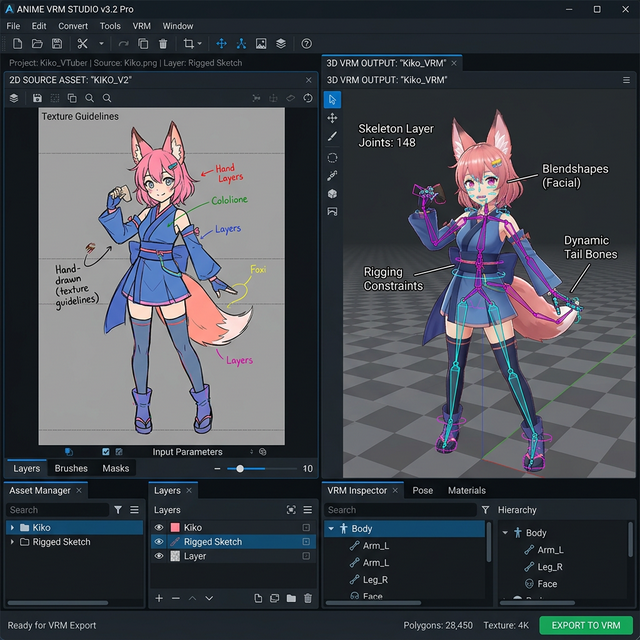
- For Streamers: Instantly generate a high-quality base mesh that you can import into VSeeFace or VTube Studio.
- For Riggers: Skip the tedious retopology phase. Download the base
.OBJor.GLBand jump straight into adding blendshapes and dynamic bone physics. - For Character Designers: Test how your 2D VTuber designs look from 360-degree angles before committing to a final illustration.
How to Convert Your 2D Avatar to 3D
Building your virtual identity is completely free and happens entirely in your browser.
- Upload Your Character Sheet: For the cleanest base mesh, upload a clear A-pose or T-pose illustration of your VTuber. Symmetrical designs with flat, cel-shaded coloring work best.
- Use Text-to-3D: No art skills? Just write a prompt. Example: “A cute catgirl VTuber avatar, pink hair, maid outfit, standing in T-pose, anime cel-shaded style.”
- Process and Export: The AI will first build the anime mesh and then project the stylized textures. Once complete, download your model.
Best Practices for VTuber Prompts
To ensure your model is ready for rigging and facial tracking, follow these tips:
- Keep hair simple. Extremely intricate, floating strands of hair can confuse the AI’s depth generation. Stick to solid, grouped hair chunks that can be easily rigged with dynamic bones later.
- Solid backgrounds. Always input images with a solid color or transparent background to prevent the AI from fusing background elements to your VTuber.
Frequently Asked Questions (FAQ)
Can I download VRM format directly?
The AI directly exports standard .GLB and .OBJ files. To convert this to the standard VTuber .VRM format, simply import the .GLB into Unity and use the free UniVRM plugin.
Does the AI automatically rig my VTuber?
The AI provides a highly detailed, textured static mesh (T-pose). You will need to apply a rigging skeleton and facial blendshapes (for ARKit tracking) using a tool like Blender or Mixamo.
Is this AI VTuber maker completely free?
Yes! Our open-source Hunyuan3D-2 framework allows anyone to generate 3D models from text and images for free, without watermarks.