AI Furniture 3D Model Generator
Instantly convert catalog photos of couches, chairs, and tables into detailed 3D models. The best free AI furniture generator for interior designers and e-commerce.
Are you an interior designer, architect, or specialized e-commerce retailer struggling to source 3D models of specific furniture pieces for your digital scenes?
Finding the exact mid-century modern chair or rustic dining table in a pre-made 3D asset store is nearly impossible. Hiring a 3D artist to model a 50-piece furniture catalog from reference photos can cost tens of thousands of dollars.
With the Hunyuan3D Furniture Generator, you can bypass the manual modeling process entirely. Upload a single 2D photograph of any piece of furniture, and our AI will reconstruct its geometry and textures into a complete 3D object.
Here is how our tool revolutionizes architectural visualization (ArchViz) and retail.
Scale Your 3D Furniture Catalog Instantly
Standard text-to-3D pipelines often struggle with the hard-surface geometry and exact proportions required for interior design. Our DiT architecture features specialized spatial reasoning capable of maintaining straight edges and structural logic.
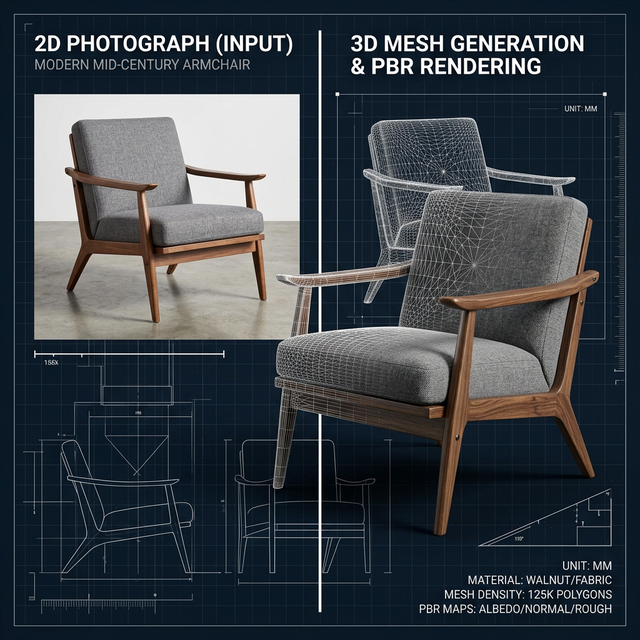
- For Interior Designers: Stop searching for approximations. If a client wants a specific sofa in their render, simply upload a photo of the sofa to generate the exact 3D model for your Twinmotion or Enscape scene.
- For E-Commerce Stores: Implement WebGL 3D product viewers on your Shopify store. Convert your flat product photography into interactive 3D models that customers can rotate 360 degrees.
- For AR Placements: Generate
.GLBformat models that can directly plug into Apple’s AR Quick Look, allowing customers to view your generated furniture in their own living rooms via augmented reality.
How to Convert Furniture Photos to 3D
Our cloud-hosted generator is free and operates directly in your browser.
- Prepare the Product Photo: For the sharpest 3D geometry, use a clear, well-lit photo of the furniture piece against a white or transparent background. A slight isometric angle (showing the front, top, and side) yields the best depth mapping.
- Upload to the AI: Drag and drop the image into our generator.
- Process and Download: The AI will infer the hidden angles and construct a full 360-degree mesh, wrapping it in the textures extracted from your photo. Download your ready-to-use
.OBJor.GLBfile.
Tips for Photorealistic PBR Quality
While the AI handles the geometry, achieving true photorealism for high-end rendering requires a little extra care:
- Avoid Pure White/Black Inputs: Pure white or pitch-black leather couches can strip the image of visual depth cues. Ensure the submitted photo has visible lighting gradients.
- Refine Materials: The downloaded model will contain a basic diffuse texture map. For Ray-Traced engine renders (like V-Ray or Corona), drop the model into your software and apply standard PBR roughness and normal maps to the generated mesh to create realistic wood grains or fabrics.
Frequently Asked Questions (FAQ)
Is this AI suitable for hard-surface modeling like metal tables?
Yes. Unlike older NeRF technologies that created “cloudy” or “melted” objects, our advanced mesh reconstructor maintains relatively sharp edges suitable for hard-surface furniture like tables and cabinets.
Can I generate multiple variations of a chair?
Absolutely. You can use the text-to-3D feature to type a prompt (e.g., “A modern armchair, velvet green, golden legs”) and use the ‘Seed’ parameter to generate dozens of unique design variations for inspiration.
Are the furniture models to scale?
The AI generates a proportionally accurate model, but it is scale-agnostic. You will need to use the transform tools in your 3D software (like Blender or SketchUp) to scale the bounding box to match the real-world dimensions of the object in millimeters or inches before rendering.