AI Anime 3D Generator
Turn your 2D anime characters, sketches, and text descriptions into high-quality 3D anime models instantly. 100% free, no download required.
Does turning your 2D anime illustrations into fully rigged 3D models feel like a headache?
You spend hours modeling hair highlights, matching the cel-shaded look, and tweaking vertex groups, only to end up with a mannequin that doesn’t quite capture the anime spirit. It’s a frustrating bottleneck for game devs and VTubers alike.
The Hunyuan3D AI Anime 3D Generator changes the rules. In less than 30 seconds, you can upload flat anime art—or just type a prompt—and instantly generate a production-ready 3D mesh tailored for cel-shading.
Here is exactly how the tool can streamline your anime character workflow today.
Why Use an AI Anime 3D Generator?
The jump from 2D anime art to 3D presents unique topological challenges. Anime faces have specific geometry requirements (flat noses, sharp chins, large eye sockets) that standard realistic 3D generators struggle with.
By utilizing Hunyuan3D-2’s advanced shape priors, our generator is fine-tuned to respect stylistic deformations.
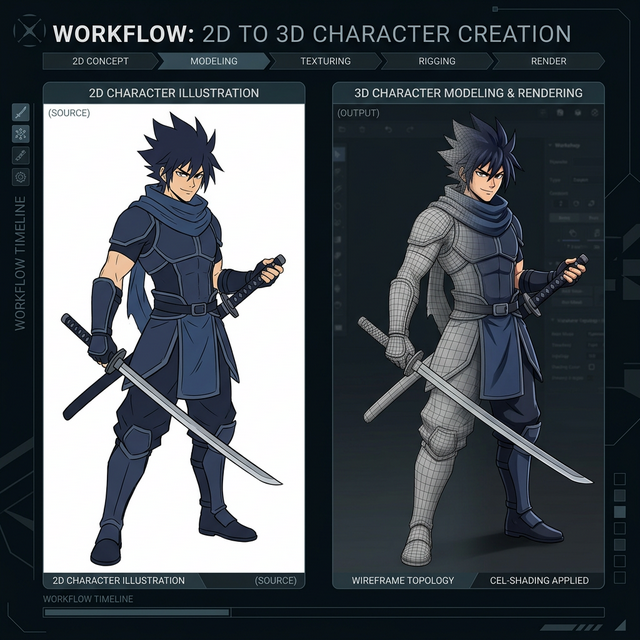
- For VTubers: Instantly prototype base meshes for Live2D or VRM conversion.
- For Game Developers: Generate hundreds of anime NPC background characters directly from concept art, saving weeks of manual modeling.
- For Illustrators: See your 2D OCs (Original Characters) from every angle to improve your perspective drawing.
How to Convert 2D Anime to 3D
Generating your first anime model is completely free and requires zero installation.
- Upload Your Art: For the best results, use an A-pose or T-pose illustration with a solid background. Clear line art and flat colors produce the cleanest geometry.
- Or Use Text-to-3D: If you don’t have art, just enter a prompt. Example: “A teenage anime swordsman, cel-shaded, spiky blue hair, wearing a white tunic, standing in A-pose.”
- Generate & Download: The AI will process the input through a two-stage pipeline. First, it generates the base anime mesh. Second, it unwraps the UVs and applies the stylized textures. Finally, download your
.GLBor.OBJfile.
Best Practices for Anime Prompts and Inputs
To squeeze the absolute best quality out of the generator, keep these rules in mind:
- Avoid complex lighting in 2D inputs. The AI tries to bake lighting into textures. Flat colors guarantee a better texture map that reacts naturally to your game engine’s shaders.
- Keep hair shapes distinct. Anime hair with massive geometric gaps can confuse the depth mapper. Solid, chunky anime hair structures (like Dragon Ball or Genshin Impact styles) generate flawlessly.
Frequently Asked Questions (FAQ)
Is this AI Anime 3D Generator free?
Yes. The platform is built on the open-source Hunyuan3D-2 framework and is completely free for the community to use directly in the browser.
What file formats can I download?
Currently, exported models are provided in standard formats such as .GLB and .OBJ, making them instantly importable into Blender, Unity, or Unreal Engine.
Can it automatically rig the anime model?
The generator outputs static meshes (T-pose/A-pose). To animate them, you will need to rig the downloaded model using tools like Mixamo or Blender’s Auto-Rig Pro.
Does it support cel-shading?
The output is a standard 3D mesh with an albedo texture map. To achieve the perfect anime look, you will need to apply a Toon Shader or Cel-Shader within your rendering engine (e.g., Unity’s Anime Shader).