Free 3D Character Creator
Design fully customized 3D characters for games and animation. Use text prompts to instantly generate high-quality 3D character models for free with AI.
Creating a unique 3D character for your game, animation, or indie project is usually the most expensive and time-consuming part of development.
Traditionally, game designers have had to rely on complex tools like ZBrush or Maya, spending weeks sculpting anatomy, baking maps, and painting textures. Or, they buy generic asset packs that every other game is already using.
The Hunyuan3D Text-to-Character Generator changes everything. By simply typing a description of your hero, villain, or NPC, our AI instantly synthesizes a bespoke, high-quality 3D character mesh ready for rigging.
Here’s how to build your cast of characters in record time.
Design Unique Heroes with Text Prompts
Our generative architecture doesn’t just kitbash existing parts together; it ‘hallucinates’ entirely new geometry based on the semantic meaning of your prompt. Whether you need a stylized anime swordsman or a photorealistic sci-fi marine, the AI can build it.
- For Indie Game Devs: Populate your entire RPG world with unique NPCs. Generate fantasy merchants, guards, and monsters in minutes.
- For Filmmakers & Animators: Quickly prototype character concepts in 3D space to test lighting and camera angles before committing to a final design.
- For D&D Tabletop Players: Bring your Dungeons & Dragons character to life. Generate a 3D model of your hero and 3D print it as a tabletop miniature!
How to Generate Your Character
Our cloud-based AI character creator requires no downloads and is 100% free to use.
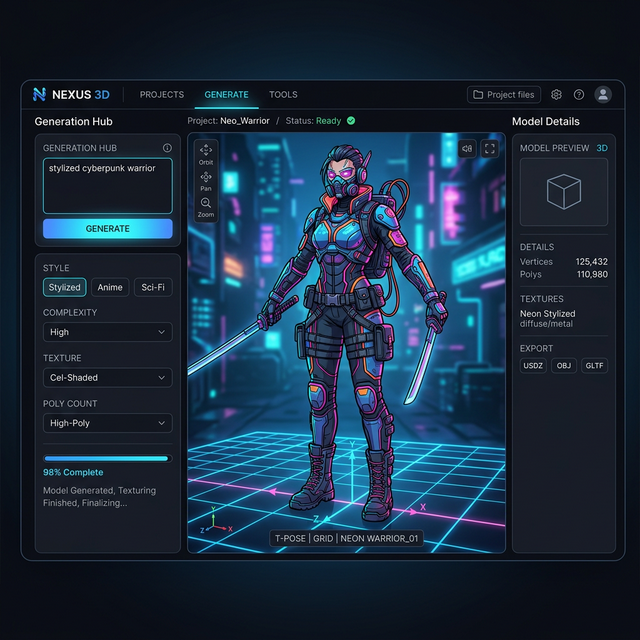
- Write Your Concept: Click into the generator and type your prompt. Be descriptive! Example: “A stylized cyberpunk warrior wearing neon armor, dual wielding katanas, cel-shaded anime style, standing in a neutral T-pose.”
- Generate the Geometry: The AI’s Diffusion Transformer will first craft the base mesh, ensuring proper proportions and topology.
- Automatic Texturing: Next, the AI paints the UV maps based on your prompt’s style requests (e.g., ‘cel-shaded’ or ‘PBR realistic’).
- Export for Rigging: Download your character as an
.OBJor.GLBfile. Import it into Blender or Mixamo for instant skeleton auto-rigging.
Tips for the Best Character Results
- Specify a Pose: Always include “T-pose” or “A-pose” in your prompt. This ensures the character’s arms are separated from their torso, which is critical for cleanly adding a skeletal rig later.
- Avoid Extreme Asymmetry: Symmetrical characters generate much faster and with cleaner topologies. If your character needs a mechanical arm, it’s often better to add that custom piece later in a modeling program.
Frequently Asked Questions (FAQ)
Is this character creator completely free?
Yes! Our tool is built on the open-source Hunyuan3D-2 framework, meaning you can generate as many characters as you need without paywalls.
Can I use these characters in Unreal Engine or Unity?
Absolutely. The generated .GLB and .OBJ files are industry-standard. Once you rig the downloaded mesh in a tool like Mixamo, it is ready to be dropped straight into any modern game engine.
Does the AI generate face blendshapes for lip-sync?
Currently, the AI generates a static base mesh. For advanced facial vertex animation (like ARKit blendshapes for lip-syncing), you will need to apply those morph targets manually in 3D software after generation.